
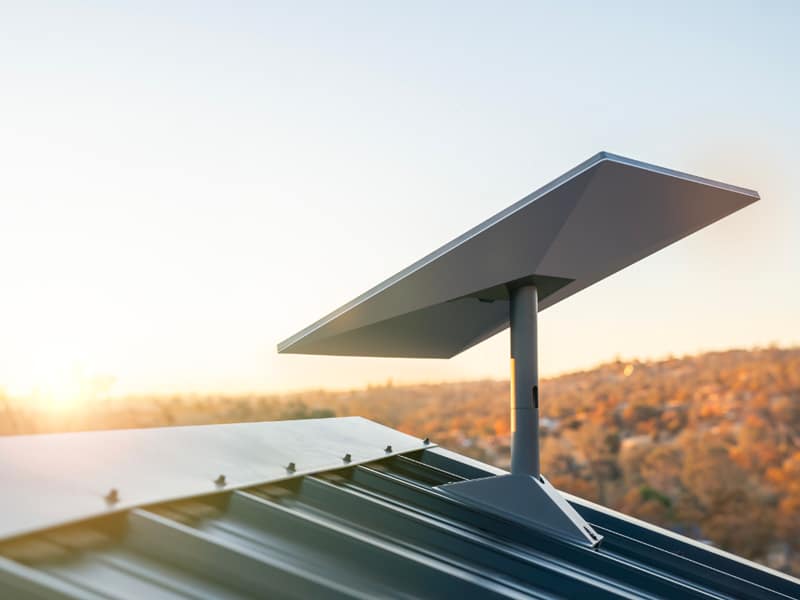
A three-day open-air festival in a field needs a working connection from the minute the gates open. Card readers at the bars, scanners at the gate and a camera feed from the stage all share the same line. A Starlink installation gives the site its own connection, with no phone socket and no fibre cable in the ground.
What does a festival actually need from its internet connection?
A festival needs a steady line for payments, ticket scanning, crew coordination and a stage feed. The figure on a speed test matters far less than whether the line holds through the busiest hour of the night.
Begin with a written list of the services that have to work. Card terminals at the bars and the food stalls come first, because a stalled payment stops a queue in seconds. Ticket scanners at the main gate and the artist entrance come next. Then the production team, who send short messages and check timings all evening. Last come the camera crew and the press, who move large files. A Starlink installation is planned around that list, not around a headline number.
None of those services is heavy on their own. A card payment moves a few kilobytes. A ticket scan moves even less. Ten people on radios and messaging apps use almost nothing. The load comes from everything running at once, in the same half hour, while a stage feed sits on top. That is the moment an event connection is judged, and it is the moment a Starlink installation has to be sized for.
It also helps to decide early who the connection is not for. Public Wi-Fi for several thousand visitors is a different job with a different budget. Most organisers keep the line closed and give it only to staff devices, payment terminals, scanners and the stream. A Starlink installation set up that way serves a known, countable set of machines.
Write down how many of each device you expect, and where each one stands on the map. Twelve card terminals spread over four bars behave very differently from twelve terminals in one tent. The distance between the dish and the furthest terminal decides how much cable and how many access points the Starlink installation needs. That answer costs nothing to work out on paper weeks ahead.
Why does a phone hotspot stop working once the crowd arrives?
Phone hotspots rely on the nearest mobile mast, and a rural mast is built for the people who live there. Several thousand visitors fill it within minutes, so staff devices slow down or drop entirely.
A quiet field tests beautifully. You stand in the grass a month before the event, open a speed test on your phone and see a healthy result. The mast serving that valley has nothing else to do. On the day, the same mast is asked to carry thousands of phones taking video and posting it. Your card terminal sits in the same queue as everyone else, and it loses.
Satellite works along a different path. The dish talks straight up to low-orbit satellites, so the local mast is irrelevant to it. Crowd size on the ground does not change what the dish receives. For an event, that separation is the main reason a Starlink installation is chosen over a bundle of mobile routers.
The numbers are usable rather than extreme. Doriforikointernet.gr states download speeds of fifty to two hundred and fifty Mbps, upload of up to about fifty Mbps, and latency of twenty to forty milliseconds. Latency is the delay before a request gets an answer, and it is what makes a card terminal feel quick or slow. A Starlink installation holding forty milliseconds feels normal to everyone using it.
Older satellite internet earned a bad name for good reason. Those services used satellites parked at about 36,000 km, and every request travelled that distance twice, which pushed delay past six hundred milliseconds. The satellites behind a modern Starlink installation orbit at roughly 550 km instead. That shorter trip is the whole difference between a line you can take payments on and one you cannot.
There is one condition the field has to meet. The dish needs a clear view of the sky and a mains power supply, and nothing else. No landline, no fibre, no contract with a local provider. For a meadow, a hillside or a beach car park, a Starlink installation is often the only honest option on the table.
How is a network set up on a field with no infrastructure?
Four questions decide it: where clean power comes from, how cables cross the site safely, where the access points stand, and how every piece of kit survives rain, dust and sun for the weekend.
A field gives you grass, a gate and whatever you bring. Everything else is built in a day. The good news is that a temporary network is a small, well understood job, as long as it is drawn on the site map before anyone arrives with a van. The order of work for a Starlink installation on open ground barely changes from one event to the next.
Power comes first, and it decides the rest
The dish and the router need mains power, and that power has to be as steady as the stage lighting. On a field this normally means a generator feeding a small distribution board. Pick the socket that is least likely to be unplugged by a tired crew member at three in the morning. A Starlink installation fed from the production generator, not from a bar extension lead, survives the weekend much better.
Put a small uninterruptible power supply between the socket and the router. A generator changeover takes a few seconds, and without that battery the router reboots and the card terminals lose their session. The battery does not need to run the site, only the network kit. It is the cheapest insurance any Starlink installation can carry.
Label the plug. A strip of tape reading “network, do not unplug” prevents more outages than any technical measure. Tell the generator crew which board the line sits on, so a planned refuel does not take payments down. A Starlink installation is only as reliable as the socket feeding it.
Cable routes are drawn before the first cable is laid
Walk the site with the map and mark where people will walk. Cables crossing a footpath go under a ramp or over a truss, never loose on the grass. Cables crossing a vehicle route go in a duct or a cable bridge, because a forklift will find them otherwise. The cabling for an event Starlink installation is short if the dish sits near the production area, and long if it has to reach a far gate.
Leave a little slack at both ends and a drip loop where a cable enters a tent or a cabin. Slack lets you move a table without pulling a connector out. A drip loop is a small downward curve that makes water fall off instead of running along the cable into the socket. Both take seconds during the Starlink installation and save an hour later.
Keep a written note of what runs where. On pack-down day, a sheet listing six cable runs is worth far more than anyone’s memory of Friday afternoon.
Access points go where staff actually stand
The router that comes with the kit covers a tent and the ground around it. A festival needs coverage at several fixed points instead: each bar, each gate, the production office, the stage wings and the press area. That is normally two to five access points fed by cable, each one aimed at the few metres where people work.
Mount them at head height or slightly above, pointing down into the working area. Do not hide an access point behind a metal counter or inside a steel container, because both block the signal badly. A Starlink installation with four well placed access points beats one with eight placed carelessly.
Weather and dust are planned for, not hoped against
The dish itself is built for outdoor use and handles rain and wind. Routers, power supplies and plug boards are not. Put each of them in a closed box or a dry cabin, raised off the ground, so a sudden downpour does not reach them. A Starlink installation on a field is only as waterproof as its weakest plug.
Dust is the quieter problem. A dry field under three thousand pairs of feet produces fine dust that works into fans and sockets. Keep spare connectors in a sealed bag and blow out the kit before it goes back in the case. Heavy rain or snow can cause a short dip in the connection, which passes in minutes and is normal behaviour for any satellite link.
Read more: Starlink installation in Afidnes
What does a live stream from the stage require?
A stream needs upload headroom and a wired path from the encoder to the router. Rehearse at the real bitrate, and agree in advance what the crew does if the picture drops.
Streaming is the one job on site that pushes data outwards all evening without a pause. Everything else sends small bursts. A stream sends a steady flow for two or three hours, and it is the first thing an audience notices when it breaks. Plan it as a separate line item of the Starlink installation, not as a bonus feature.
Upload is the number that matters
Most people read the download figure and stop. For a stream, upload is the figure that decides everything. The company states upload of up to about fifty Mbps, which is comfortable for a single stage feed and leaves room for the rest of the site. A clean picture at full high definition usually sits between six and twelve Mbps.
Set the encoder below what the link can carry, never at its limit. If the Starlink installation gives you forty Mbps of upload on the night, a stream at eight Mbps is safe and a stream at thirty is asking for trouble. The spare capacity absorbs the moment when photographers start sending files and the box office syncs its sales.
Two stages streaming at once doubles the demand, and a second camera position adds more. Add the numbers before the event rather than during it. If the total gets close to the available upload, drop one feed to a lower bitrate or stagger the start times. A Starlink installation cannot invent capacity that is not there.
The encoder goes on a cable, not on Wi-Fi
An encoder is the box or laptop that turns the camera signal into a stream. It should reach the router through an ethernet cable every time. Wi-Fi in a crowd is unpredictable, and a stream is the least forgiving thing to put on it. Ask for that cable run while the Starlink installation is being planned, so it is pulled with everything else.
If the stage is far from the dish, run the cable to a switch near the stage and feed the encoder from there. Keep the run away from power cables and lighting dimmers where you can. A short, tidy, labelled run from encoder to router is worth more than any setting in the streaming software.
Give the encoder a fixed address on the network and write it on the production sheet. When something goes wrong at ten in the evening, nobody wants to guess which device is which. A Starlink installation handed over with a one page network sheet is far easier to work with under pressure.
Rehearse at the real bitrate, on the real site
Test the stream the day before, from the actual stage, at the actual bitrate, for at least twenty minutes. A thirty second test proves nothing. Let it run while the crew tests lights and the bars test their terminals, because that mix is what the night will look like. A rehearsal run that way tests the whole Starlink installation, not only the camera.
Watch the stream on a phone over a mobile connection while it runs, not only on the local monitor. Looking at it locally hides problems between your site and the viewer. If the rehearsal is clean, the Starlink installation and the stream settings can both be signed off and left alone.
Record the rehearsal figures somewhere: bitrate, dropped frames, latency. Next year’s crew will thank you, and so will the technician who comes back for the following Starlink installation at the same site.
Decide now what happens if the picture drops
Short dips happen on any connection, satellite or otherwise. Heavy rain can cause one. The question is not whether a dip is possible but what the crew does in the first thirty seconds. Write that down and tape it to the encoder.
A workable plan has three steps. Keep recording locally so the set is never lost, even if the stream stops. Put a holding card on screen instead of a frozen frame. Have one named person who decides whether to restart or continue, so two people do not pull the same cable. A Starlink installation with a written fallback plan behind it rarely produces a crisis, only a short gap nobody remembers by morning.
How do ticket scanning and card payments stay up at the gate?
Keep the gate and the bars on the main line, and give each one a cable or its own access point. Hold the terminals off the guest network, and test every device in place.
The gate is where a weak connection becomes visible to the public. A queue of four hundred people moves at the speed of the slowest scanner. A bar with a stalled card reader empties into the next bar. These are the two points where the Starlink installation earns its place, and they deserve the best positions on the network.
The short list of services that must never drop
Print this list and walk the site against it on the morning of the event. Every line on it has a named owner and a tested device.
| Service | Where it lives | What it needs |
|---|---|---|
| Card payments | Bars, food stalls, merchandise | A stable line and a terminal in range of a nearby access point |
| Ticket scanning | Main gate, side gate, artist entrance | Offline mode enabled, plus a cabled access point at the gate |
| Box office sales | Ticket window at the entrance | A wired connection, because a cash desk cannot wait |
| Accreditation checks | Backstage door, crew gate | A tablet with a charged battery and its own access point |
| Production messaging | Office, stage wings, security posts | Light bandwidth, wide coverage, no competition from large uploads |
| Stage stream | Encoder position at the stage | Reserved upload capacity and a cable to the router |
Nothing on that list is heavy. Together they are the event. A Starlink installation sized for this table, with a little room spare, will not be the reason a queue stops moving.
Give the gate its own coverage
A gate is usually the furthest point from the production area, and it is surrounded by bodies. Bodies absorb Wi-Fi, so the signal that reached the empty gate on Thursday will not reach the busy gate on Friday. Run a cable to an access point mounted above head height at the gate itself. This single step solves most gate problems before they start, and every experienced Starlink installation team will suggest it.
Keep the access point on the inside of the gate, aimed outwards towards the scanners rather than down the queue. Two scanners standing a metre apart share one access point easily. Scanners spread across a wide entrance may need two. A second access point costs little, and the Starlink installation can feed both from one cable run.
Turn on offline mode and know what it covers
Most ticketing apps can scan without a live connection and sync afterwards. Switch that on, and download the guest list onto each device before doors open. Then a brief dip means a short delay in syncing, not a stopped queue. Even with a solid Starlink installation behind you, offline mode is free protection and there is no reason to skip it.
Card terminals are less flexible, because a payment has to be authorised at the moment it is made. Some terminals hold a small offline float, and some do not. Ask your provider which you have, and keep a cash option at one till as a backstop. A Starlink installation with a battery behind the router makes that backstop a formality.
Separate the networks and keep them separate
Put payment terminals and scanners on their own network name, with a password only the relevant staff hold. Keep crew devices on a second one. If you offer any guest access at all, keep it third and limited. A Starlink installation split this way stops one person’s download from slowing the gate.
Say out loud, at the briefing, that the staff network is not for phones. One large upload from a bored volunteer can crowd a card terminal on the same access point. Separation handles most of this, and a clear instruction handles the rest.
Test each device where it will stand
A terminal that works at the production tent proves nothing about the far bar. Carry every device to its final position, take a real test payment and a real test scan, and sign it off on paper. Do this before the public arrives, not during the first rush. A Starlink installation is only finished when the last terminal on the far side of the field has been tested in place.
Read more: Starlink installation in Acharnes
What do crew, press and photographers need?
They need somewhere quiet to sit, power for laptops and batteries, and enough upload to send large files on a deadline without slowing the gate or the stage stream.
Press and crew are the group most often forgotten in the plan, and the group that complains loudest when the plan is thin. Their needs are modest and easy to meet, but they are different from the needs at the bars. One small room or tent, set up properly, covers nearly all of it. Build that corner into the Starlink installation from the start.
File transfers are big, and they come in waves
A photographer shooting the headline set leaves the pit with several hundred large images. A video editor cutting a daily recap handles files in gigabytes. Both of them want to send everything in the twenty minutes before a deadline. That is the heaviest upload demand of the whole event, and it arrives in short, fierce bursts. A festival Starlink installation has to absorb them without blocking the gate.
Two habits keep this from hurting anything else. Ask the press team to send edited selections rather than whole cards, which cuts the volume dramatically. Then agree a window for the heaviest transfers, outside the gate rush and away from the stream’s busiest hour. A Starlink installation with fifty Mbps of upload can serve several photographers at once, as long as nobody starts a full card dump during the main set.
If one person has an unusually large job, give them a cabled seat in the press corner. A cable takes them off the shared wireless and makes the transfer both faster and quieter for everyone else. This is the simplest adjustment any Starlink installation allows.
A quiet corner is a working requirement
Photographers and reporters need to see their screens, hear a phone call and not be knocked by a passing crowd. A tent behind the stage, a cabin near the production office or a shaded corner of a building all work. Keep it out of the direct sun, because laptops throttle in heat and screens become unreadable.
Put the press corner within reach of the cabling you already planned. If it sits next to the production office, it shares the same cable route and the same access point budget. Deciding its location early keeps the Starlink installation tidy and avoids a long cable pulled across a path on the day.
Three or four tables, a few chairs and a bin are enough furniture. The point is a stable place to work, not comfort.
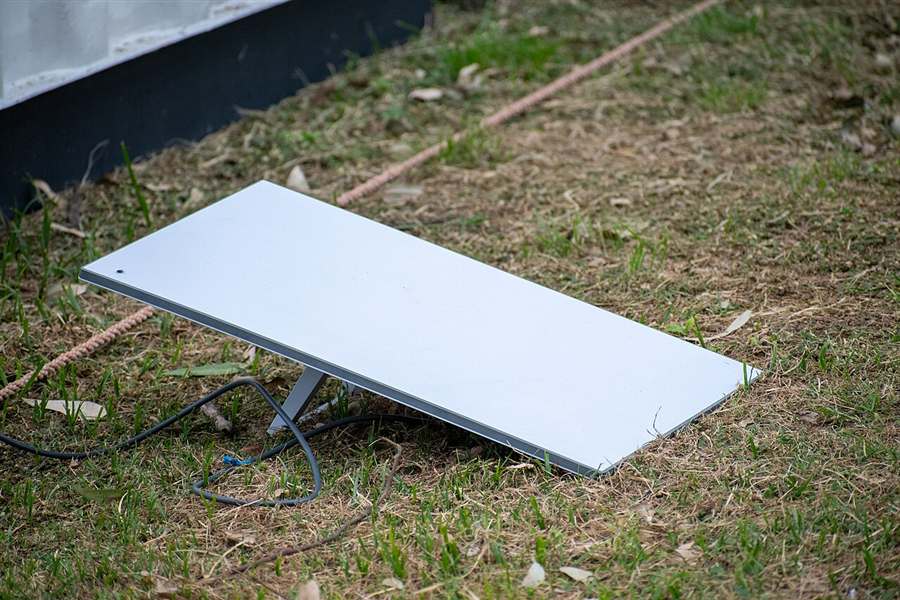
Power and charging matter as much as bandwidth
A press corner with fast internet and two sockets is a press corner that does not work. Count the laptops, the camera battery chargers and the phones, then provide a plug board per table. Label the boards so nobody unplugs a charging camera battery to run a kettle.
Keep the network kit on a separate circuit from the charging tables. A tripped socket in the press tent should never reach the router. Any technician planning a Starlink installation for an event will separate those two loads if you mention the press corner in advance.
Add a small table with spare cables and card readers. A borrowed ethernet cable has saved more deadlines than any upgrade.
Deadlines decide the priorities
Press deadlines are real and they do not move. A review filed late is a review nobody reads. Ask the press team when their deadlines fall, and write those times on the production schedule next to the set times. The whole point of the Starlink installation is that those two schedules do not fight each other.
If a clash is unavoidable, protect the gate and the payments first, the stream second and the file transfers third. Everyone understands that order when it is explained in advance. Nobody understands it when it is improvised at midnight.
Give the press team one named contact for connection problems, and give that person the network sheet. They should know the network names, the passwords, where the router sits and who to call. A Starlink installation is handed over with a short training session for exactly this reason, and that knowledge should not live with one person who goes home at eight.
Finally, keep a short log of what went wrong and when. Next season you will plan the same field in half the time, and the same Starlink installation will take an hour to repeat instead of an afternoon to invent.
Where does the dish go on an open site?
The dish goes high, above head height, with clear sky around it. On a bare field a Starlink installation stands or falls on two choices: how high the mount sits and where the cable runs.
An empty field changes shape in three days. First there is grass and a gate. Then stage, bars, fences and dry toilets arrive. The dish position for a Starlink installation is picked against the finished site plan, never against the empty field.
The walk-round that comes first
A technician walks the ground with a phone in hand. The Starlink app carries an obstruction check. The camera sweeps the sky and the app marks what blocks it. Trees, scaffold towers and parked trailers all show up as blocked sky.
That step takes ten minutes and saves the weekend. One plane tree at the edge of a field can clip the line for seconds. Those seconds tend to land at the worst moment of the night.
Height is what beats the crowd
At two metres a person standing in front of the dish is harmless. At one metre the same person is a problem. So the dish climbs onto the production truck, a pole or a scaffold leg. Any Starlink installation on a tripod needs sandbags on the feet, because wind rises after dark.
A container office roof is the other safe answer. It is flat, it is locked, and nobody leans a barrier against it.
The cable route across a field
Cable never runs loose over a walkway. It goes into a ground ramp, or overhead on a tensioned wire. Every temporary site shares one enemy: the forklift carrying barriers at midnight.
A festival Starlink installation gets its route marked in coloured tape and shown to the site manager. Two people then know where not to dig and where not to drive. That is cheaper than a spare cable.
What does the technician do during a Starlink installation on site?
On-site work runs one to two hours. The team usually arrives within two to four working days of the order, fits the mount, sets up the router, measures the line, then hands over a working network.
The kit is ordered first, because it has to travel to the site. A visit is booked two to four working days later. For a site that opens on a Friday, the crew comes Tuesday or Wednesday. Two clear days are then left for tests with real people.
The steps inside those two hours
- The base is fixed to a pole, a wall or a weighted plate.
- Cable is run on a protected path from dish to router.
- The router is configured, with network names and passwords written down.
- Download, upload and latency are measured at three points on site.
- Gate devices and the production office are connected and tested.
Handover rests on numbers, not on a feeling. Download sits inside the band of 50 to 250 Mbps. Upload reaches about 50 Mbps. Latency is the delay for a signal to go out and come back, and it reads 20 to 40 ms.
Every Starlink installation closes with those figures written on one sheet. The production office keeps the sheet for comparison. Numbers may drop on a later night. The sheet shows how far the line has moved from its own normal.
What stays in the organiser’s hands
At the end the technician shows three things to the person in charge. First, where the switch is and what the router light means. Second, how the app reports a power cut or a dropped line. Third, which number to call when something stops mid-show.
A Starlink installation without that handover leaves night staff guessing in the dark. The short training lasts ten minutes and saves hours. A duty manager learns one move for power and one for the network. Nothing else is asked of the crew.
Read more: Starlink installation in Psychiko
What changes when the site is a remote hillside?
A hillside adds three problems: no socket nearby, steady wind, and a track a van barely climbs. A Starlink installation still works up there, because it asks for sky and power, not for buried cable.
Many open-air events sit where no provider ever laid a line. A plateau above a village, an old quarry, a beach field. Low-orbit satellites pass at roughly 550 km, so the signal reaches those places as easily as it reaches a suburb. A Starlink installation in such a spot is ordinary work, not an experiment.
Power comes before everything
Dish and router run on mains power. On a field that power comes from the event supply. The technician asks one question early: which board feeds the production area?
The router then shares a circuit nobody switches off at night. A bar fridge on the same line is a bad neighbour. Each Starlink installation on a temporary site needs its feed labelled, so no one unplugs it for a kettle.
Wind, slope and dust
A slope funnels wind. A mount that holds in a yard can rock on a ridge. Pole mounts get guy lines, and weighted bases get more weight than the flat-ground version.
Dust is the quieter problem. Vehicles on a dry track raise it, and it settles on the face of the dish. Two minutes with a cloth clear it. On dry ground that check belongs in the morning round of every Starlink installation, not in the middle of a set.
The track the van has to climb
A site survey covers access as well as sky. The crew has to reach the spot with the kit, the mount and a ladder. Where the van stops short, the gear is carried by hand.
The plan for a Starlink installation on a ridge includes that walk. The visit then takes the longer end of one to two hours. Mountain and island sites are routine for the Athens team, with more than 350 installations behind them.
How does the line cope with heat, dust and thousands of phones?
Heat and dust ask for shade and a wipe. Thousands of phones never touch the satellite line itself; they crowd the Wi-Fi. Separate crew networks keep the gate and the office clear of that traffic.
Summer heat on an exposed field
Hardware runs hotter in July than in a test on a cool morning. The router suffers more than the dish. It wants air around it, not a closed plastic box in the sun.
A shaded shelf inside the production cabin solves that. Every Starlink installation on a summer site gets the router out of direct sun and off the floor. A crate turned upside down is enough.
The crowd’s own phones
Visitors bring their own data plans, and the mobile network carries them. Trouble starts when staff Wi-Fi is left open. Hundreds of devices then join a network built for twelve. The gate scanner waits in that queue.
Closed networks with passwords are the fix. A Starlink installation serving an event usually carries two or three separate names: gate, office, stage. Guest access, where it exists, sits on its own name with its own limit.
Rain, and what a short dip looks like
Heavy rain or snow can cause short dips. The picture is not a dead line for an hour. It is a few seconds of slower response, then recovery.
Older geostationary services sat about 36,000 km out, with latency above 600 ms. Against that, a few slow seconds belong to a different class of problem. Card terminals retry, and a stream buffer rides it out.
A storm forecast changes the plan anyway. Tarps go over the cabin, the router is raised off the ground, and the gate keeps a paper fallback. A Starlink installation is weatherproof outdoors; the soft part is always the office table.
Which mistakes cost the most?
The expensive mistakes are not technical. They are late orders, a dish hidden behind a tree, an open staff network and no plan for power. Each one is cheap to avoid a week ahead.
Most faults on site were decided in an office weeks earlier. The list below collects the ones that keep returning in Starlink installation work on temporary ground.
- Ordering too late. Delivery and a visit need two to four working days, and build week is already full.
- Picking the spot without an obstruction check. A tree in leaf blocks sky that looked open in winter.
- Mounting the dish at chest height. Crew, crowd and trucks then pass through the line of sight.
- Running cable across a vehicle route. One pallet truck ends the evening for the whole gate.
- Leaving the staff network open. Hundreds of visitor phones join it and the scanner slows down.
- Taking power from the nearest socket. Someone needs that socket for a fryer and the router dies.
- Testing on an empty field. Numbers look fine with nobody there and no equipment running.
- Keeping no paper fallback. A two-minute pause at the gate becomes a queue nobody can explain.
None of these is a hardware fault. A Starlink installation handles the sky; the rest is site planning. Two short conversations in the build schedule remove most of the list.
Which checks matter during the event and at pack-down?
One person owns the connection each day. A morning round, a test before doors open and a look at the app during peaks catch almost everything. Pack-down is a two-person job.
The morning round
The round takes fifteen minutes. The dish face is wiped, the cable is traced end to end, and the ground ramp is checked for lifted edges.
Then the router is read: power light, network light, app status. A speed test on the office laptop goes on the same sheet as the handover numbers. Comparing a Starlink installation against its own first-day figures beats comparing it against a brochure.
The test before doors open
Half an hour before the gate opens, a real ticket is scanned. One card payment is taken and refunded. The stage encoder is confirmed as still connected by cable.
Those three tests take five minutes. A Starlink installation earns trust by passing them every day, not only on the first. Equipment moves overnight, and a cable pulled half out looks exactly like a cable in place.
During the show
Peak load lands when the headline act starts and when the gate closes. Someone keeps the app open on a phone at those two moments. If the line dips, the app says whether the cause is the line, the power or one access point.
That answer decides who gets called. A dropped access point is a site job for the crew. A real outage on a Starlink installation goes to the support number instead.
Pack-down without damage
Pack-down on a Starlink installation starts with the router, not the dish. Cables are coiled, labelled and bagged, and the mount comes down with two people on it.
The dish goes back in its own case, face protected. Kit packed badly is kit that fails at the next site. A Starlink installation that is reused each season is worth those five extra minutes.
Read more: Starlink installation in Cholargos
What does the cost of a Starlink installation on an event site depend on?
Cost follows the site, not the brand. Access points, cable length, the type of mount, how many days the site runs and how hard the spot is to reach all move the figure.
No two fields need the same Starlink installation. A small field with one cabin is quick. A site with a gate, an office, a stage and a press tent needs more cable and more access points. Published figures sit on the price list at doriforikointernet.gr/timokatalogos/.
What drives the work up
- Distance from the dish to the furthest device that must be wired.
- The number of access points needed to cover gate, office and stage.
- Mount type: wall, roof, pole, weighted base or tripod on soft ground.
- Cable protection across vehicle routes and public walkways.
- How long the site stands, and whether the kit is removed afterwards.
- Access for the van, and how far the gear travels by hand.
A quote for a Starlink installation is built from that list after the survey. Nobody prices a field they have not seen. The survey also decides whether one dish covers the ground or a second position is wiser.
Buying once, using every season
Event kit is often bought once and reused. Dish, router and cables come out of storage each year. A Starlink installation that returns to the same field each season needs a shorter visit the second time.
Annual maintenance is available on request. Seasonal support fits sites that run for one part of the year and sit idle for the rest. A seasonal Starlink installation also has a quiet half of the calendar, and that is when checks are easy.
What support follows a Starlink installation?
Support is phone and online help first, then an on-site visit when the line really needs hands. Event dates are known in advance, so cover can be arranged for the days that matter.
The first call
Most faults are solved on the phone. The questions are plain: what does the app show, what colour is the router light, is there power at the board? Half the calls end with a plug pushed back in.
Keeping the handover sheet near the router shortens every call. The person answering can compare today’s reading against day one. A Starlink installation with no written figures turns every call into guesswork.
When someone has to come out
On-site visits are part of the service. A mount knocked out of line, a crushed cable or a failed router needs hands on the kit. The Athens team covers the mainland, the islands and remote sites.
For a four-day event it is worth agreeing in advance who answers at two in the morning. That one sentence in the booking saves a long argument later.
Between events
Kit in storage does not stay in good order. Connectors corrode in damp sheds, and mounts bend in the back of a van. A pre-season check costs one short visit and avoids a build-week surprise.
The same visit updates router settings and passwords. Staff change between seasons, and old passwords travel with them. A Starlink installation handed to new people deserves the ten-minute training again.
Questions organisers ask before they book
The same questions come back every build week. Short answers follow on timing, cables, speed, blocked sky, storms, coverage and what happens to the kit once the site closes.
How soon can a field have a line?
Orders for a Starlink installation are usually completed within two to four working days. The visit itself runs one to two hours. Booking in the week before build is the safe habit, not the week of build.
Does the site need a phone line or fibre first?
No. A clear view of the sky and mains power are the two requirements. A Starlink installation needs no copper pair, no fibre and no permission from a cable operator.
What speed should an organiser plan around?
The company states 50 to 250 Mbps download and up to about 50 Mbps upload. Latency reads 20 to 40 ms. Those figures carry a stream, a gate and an office at the same time.
What if the stage blocks part of the sky?
The obstruction check finds that before anything is bolted down. The answer is a higher mount or a different corner. A Starlink installation is placed around the finished build, not around the empty ground.
What happens in a storm on the second night?
Heavy rain or snow can cause short dips of a few seconds. The gate keeps a paper fallback for those moments. Cover the router, raise it off the floor and carry on.
Can one dish cover gate, stage and office?
On most sites, yes. Coverage comes from the access points, and the critical devices are wired rather than wireless. A large site may be served better by a second Starlink installation at the far end.
Can the same kit be used next season?
Yes, with care at pack-down and a check before the next build. Annual maintenance is offered on request, and seasonal support suits sites that work for part of the year.
Read more: Starlink installation in Chalandri
Who puts the line in and stands behind it?
doriforikointernet.gr is an Athens-based team of certified technicians. It supplies, fits and supports Starlink across Greece, from city sites to islands, remote fields and mountain ground, with more than 350 installations completed.
The work begins with a survey and an obstruction check, and ends with measured figures and a short training session. Mounts cover wall, roof, pole, weighted non-penetrating base and tripod, so a field with no building is no obstacle.
Support runs by phone and online, with on-site visits when the kit needs hands. Annual maintenance is available on request, and seasonal cover fits event sites. Each Starlink installation is handed over ready to use, not left half configured.
Contact: Kafkasou 20, Athens. Phone 213 090 5808. The price list sits at doriforikointernet.gr/timokatalogos/, so an organiser can read the figures before any call.
A Starlink installation booked for an open-air event includes the following:
- The official kit: dish, Wi-Fi router, power supply and cables.
- A site survey with an obstruction check before any mount is fixed.
- A mount chosen for the ground: wall, roof, pole, weighted base or tripod.
- Cabling on a protected route and full router setup with passwords.
- Speed, upload and latency tests, written down and left on site.
- A short training session for the person who runs the production office.
- Phone and online support, plus on-site visits when they are needed.
- Annual maintenance on request and seasonal support for event grounds.
Read More:
- Έξυπνοι Θερμοστάτες και Αποδοτική Θέρμανση: Ο Πρακτικός Οδηγός για το Σπίτι σας
- Programmatic Advertising στην Ελλάδα: Ο Πλήρης Οδηγός για το Μέλλον του Digital Marketing
- Megalopoli FM Ενημερωτικό Portal: Ο Πλήρης Οδηγός Για Νέα, Ραδιόφωνο Και Ελληνική Ενημέρωση Σήμερα
Περισσότερα άρθρα θα βρείτε στην αρχική σελίδα του laacousticmusicfestival.com.